This page of the site contains the latest 10 articles to appear on bythom, followed by links to the archives.
A Little More Gets Announced
LEDE ON
The lede seems to never change now: expect price increases and product shortages for the foreseeable future. Camera company executives are becoming fairly frank about that with dealers, and it’s only a matter of time before we see them have to say the same thing to customers. Meanwhile, multiple card and drive companies are telling me that they see no change in their ability to get more parts and a continued upward pressure on prices.
All of which is going to make for a messy holiday season. I was surprised when one dealer said that not being flooded with inventory this year might actually out better for them. Fewer sales at or near full price without hanging inventory or constant restocking is a side benefit, I guess.
——————————
News
Canon R8 Mark II Arrives
Canon has updated their entry level, full frame, mirrorless camera, though perhaps more modestly than some expected after a three-and-a-half year run for the original. No, it’s not a legacy body design (unless you consider the original R8 legacy ;~). No, it doesn’t have more pixels. A lot of the rumors that popped up as the R8 aged out simply didn’t pan out.

What did show up is sensor-based stabilization (7.5 stops CIPA), a half-second of pre-capture at 20 fps, and an updated autofocus system, all in a more squared up body that now has a thumb stick on the back. Canon also joins Fujifilm, Nikon, and Panasonic in directly downloadable color profiles. Things that will probably get criticized are that Canon stuck with the smaller LP-E17 battery and a single card SD card slot (though the card is now more accessible with a side door). The body-only price is now US$1899.
Overall, Canon has done the same thing with the R8 as Nikon did with the Z5: bring it more in alignment with the rest of their lineup, and making sure that it has a full set of baseline features coupled with a few performance enhancements.
I’m sure the R8 will get a fair amount of press, as it’s only the four mirrorless camera to appear this year (R6V and A7RVI appeared in May, OMDS OM-Pen arrived this past week).
Meanwhile, Canon also showed that Japanese haven’t quite ceded the flash market to the Chinese yet by also introducing the US$380 Speedlite EL-5 (version 2). The new version is mostly a performance upgrade, which improves wireless distance. The trick? Version 2 requires a Canon multi-function hot shoe (the one with the extra pins at the front). The added communication this provides—currently beyond the reverse-engineering of the Chinese—allows for Canon’s Camera Connect app to communicate with the EL-5 (version 2), among other things.
——————————
News
Sony Takes on Nikon

Sony added two lightweight telephoto lenses to their lineup, the 400mm f/4.5GM OSS (see above), and the 600mm f/6.3GM OSS, both of which fairly clearly target Nikon’s lenses with the same focal length and aperture.
These new lenses use dual XD linear motors for fast focusing, get the full array of function ring and buttons, have Nano AR coating, and come in a dust and moisture-resistant body. The 400mm f/4.5GM OSS weighs 35.1 ounces (994g) and only nicks US$2699 from your credit card, while the 600mm f/6.3GM OSS also tips the scales at 35.1 ounces (995g) and requires a one-time US$3699 tithe to Tokyo. Both lenses feature apertures that go to f/20, support continuous autofocus up to 120 fps, and have a built-in, rotating tripod collar. Both lenses focus down to 98 inches (8.2ft, or 2.5m).
——————————
News
The X System Has a Baby
Fujifilm finally tied their two viral trends together—Instax and X-legacy design—into the Instax Pal 2, a compact compact camera that, at least in panda form (silver over black), looks like the progeny of a Fujifilm X100 mating with a Kodak Charmera. The baby is a bit chubby, but still cute:

The base is essentially a 10mp camera with a 28mm (equivalent) f/2.2 lens in something that seems to have a fair number of kitchen sink features added to it. For instance, there’s an offset optical viewfinder if you don’t want to frame using the look-down 1” LCD. On the front is a small mirror should you decide to create selfies and want to see how you’re framed. Up top is a simplified two dial, one lever, four button set of controls that allow you make your image style choices, one of which includes a 10-frame slow burst that’ll be made into a GIF. Also up front is a small, low-powered flash.
While the Instax Pal 2 has a microSD card slot, it’s really designed to slide out the male USB-C connector and plug into your smartphone for simple, direct, and convenient image transfer to Fujifilm’s app. You can also use Bluetooth, but I’m not sure why you’d opt for that complication. The wireless communication on the Instax Pal 2 is best used to communicate to an Instax printer, for that (near) Polaroid type experience.
From a design standpoint I’m impressed with what Fujifilm did here. First, that viral retro look the X series cameras have popularized is in full force here, and even though the controls are doing different things, they look retro. Second, the user experience seems to have been carefully considered, and fairly completely covered with the options that are built in. Third, we still get the direct-to-Instax printer capability, but now we get a very direct plug-into-smartphone capability, as well. This is going to be a popular camera with the young, and probably the party camera of all-time (think about the implications in weddings of passing a few of these around, having a printer available, and allowing people to grab off images to their phone pretty simply).
But more than anything else, this seems like the most complete Instax instantiation yet. Remember that GIF feature? Turns out you can have the printer put a QR on the print, which lets recipients of the print scan and get the full GIF experience. I’s dotted, T’s crossed. Well-done, Fujifilm.
——————————
News
Panasonic 20mm f/2.5
Panasonic announced a new compact prime lens—what I call muffin size, though it’s a small muffin—in the L-mount. At 142g and only sticking out 1.6” (41cm) from the mount, this is a nice little wide-angle full frame option that surprisingly doesn’t exist in the RF, Z, or even FE mounts. Even the Chinese f/2.8 lenses I see at this focal length are bigger, so bravo, Panasonic, for finding a niche and building your nest there first.
——————————
byThom News
Filmbodies is now locked and loaded
The new filmbodies.com site has been available for awhile, though there were still a lot of little odds and ends that needed to be dealt with behind the scenes. I’ve now taken the time to get (most of) that all cleaned up, and the site now should be very consistent in appearance and function across all its pages. I still have two other background tasks to do, but I should get to them soon. Meanwhile, I’m in progress of creating two new reviews for the site (and bringing two older ones back), all centered on scanning your film images. Obviously, Nikon isn’t creating any new film SLR bodies, so I’m trying to refocus on questions that site visitors have been asking me, and one of the big ones is “how do I scan my images?” The answer, my friends, is blowing in the office fan… As Pournelle used to write: Real Soon Now.
Cameras and Lenses Appear (or Not)
LEDE ON
The announce-arrive cycle appears to be getting longer. It used to be that new product announcements meant the product was already on its way to, if not already in the backrooms of, retail stores. In the late teens, that transitioned to be more announce, then ship within a month. With the Sony FX5, we’re now in the announce, then more than two months later it’ll show up era. Moreover, coupled with the fact that almost every new camera product of any note in the past five years has produced the notorious “demand is higher than expected” notice out of some sushi bar in Tokyo, I’d say that we’re fully in an era of Announce Disconnection. One has to wonder whether the industry is becoming so irrelevant that they have to send out smoke signals every once in awhile to remind folk gathered elsewhere that they’re still around. Nikon has managed three smoke signals so far this year. Pentax (see below) has taken up sending premature smoke signals.
——————————
News
OMDS Announces New Entry Camera
OMDS designers finally picked up their pens and designed a new camera. The OM System PEN is something between the older E-P7 and the original Olympus Pen-F, though it enters towards the bottom of the lineup at US$1000 (US$1300 with two lens kit).
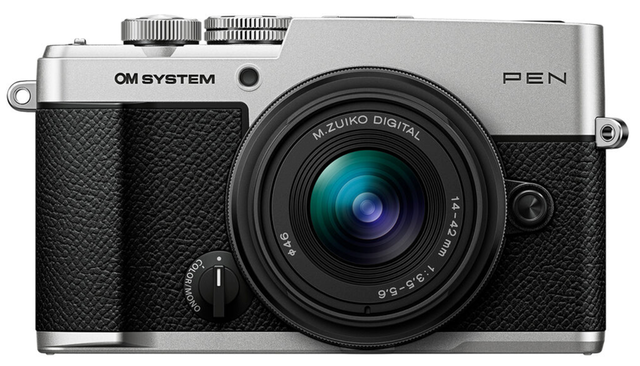
Many of the external attributes of the new camera appear to be a modernization of the E-P7 using the OM-5 II innards, though there are four significant changes: (1) the new body is weather sealed (IPX1 rating); (2) there’s now a rangefinder-style integrated 2.36m dot viewfinder; (3) the Rear LCD is now articulating instead of tilting; and (4) a new BLS-7 battery that produces 410 images (CIPA). At US$1000, the OM System PEN also bumps up in price from the E-P7 it appears to be replacing.
Inside we have a 20mp image sensor and TruePic IX (again, the OM-5 II versions). Stylistically, the new design does evoke some legacy look to it, particularly in the panda version of the camera. There’s a cleaner look to this camera than many previous OMs, and the slight bump grip on the right side is part of that. Personally, I don’t like the position of the ON/ViewMode switch, as that knob is in a place where it’s going to get accidentally triggered. I really don’t understand why the Japanese continue to make this type of design error, though it does keep the the controls all to the right and leaves the rest of the top plate clean.
The price places the OM System PEN well above the OM-D E-M10 Mark IV that’s still being sold, and well below the OM-3. My guess is that the E-M10 Mark IV has seen its last Mark. It never got the OM branding, and now it’s in a zone that would make it very difficult for a low-volume producer such as OMDS to make profits from.
It is interesting that this new camera also seems to indicate a shift in branding for the company. It’s not Olympus. It’s not OMDS the company, but cameras and lenses are now labeled as "OM System”. Some of this has to do with what trademarks OMDS inherited on the split from Olympus, but I’m surprised it took them this long to actually recognize the value in the OM portion and promote it to “system” status.
A couple of further thoughts…
First, I’m sure the PEN will sell quite well, particularly in Asia where the E-P models have done well. We’ll likely see a bump in OMDS unit volume again. But it essentially undercuts the OM-5 II, so I’d guess that we’re mostly going to see a shift of volume from one model to another, not a huge spike. The camera OMDS really needed is what I’ve been saying they should make for a decade now: a compact m4/3; Pen-styled, small, loaded with that computational tech provided by TruePic. That would have done more for their bottom line than the PEN we got.
I mention the OM-5II for a reason: it’s not much different in size (mostly the small viewfinder hump and bigger front grip), and uses the same technology. However, the OM-5II does sport some key differences: IPX53 rating, one-stop better IS, UHS-II support, 1/8000 mechanical shutter, and a slightly faster maximum frame rate. What it doesn’t have that the PEN has is the new battery, a new subject detection function, and a second Custom setting on the Mode dial. I’d rather have the OM-5II than the PEN, I think.
Second, the current omsystem.com Web site page for the PEN has a lot of images on it that feel crunchy or uncompelling to me. The redhead, for instance, has blown skin on one side of her face and overly pink skin on the other. Focus is on her teeth, not her eyes. It’s just not a portrait I’d be highlighting. But other images on that page seem dull or incorrect, as well, and skin tones are all over the place. Perhaps OMDS thinks they’ll illustrating Profile Control, but if that’s what the results are, why would I want it?
——————————
News
A Week Full of Lenses
Besides Nikon’s Development Announcement of nine Z CINEMA lenses, one of which (50mm t/1.9) was on display at IBC (International Broadcasting Convention) this week, we also got a number of literal lens launches:
- OMDS introduced another new (third) version of the 14-42mm f/3.5-5.6 R kit lens with the PEN, now moving to the OM Syystem branding from the original Olympus one. In addition, the lens is now IPX1 rated, and can focus down to 5” (13cm), which gives it a maximum magnification just under 1:4.
- Sigma announced the much-leaked 85mm f/1.2 Art lens, as well as surprise 20-60mm f/2.8-4 Contemporary lens. Both lenses show up for the Sony E as well as the L-mount. The 85mm sells for a reasonable US$1600, and has all the features you’d expect from an upscale portrait lens. Up front you’ll need 82mm filters, though. The 20-60mm f/2.8-4 clocks in at US$850, and the MTF values show why it’s at that price and labeled Contemporary, as it fits more of a consumer than prosumer spec. It’s a reasonably compact lens
- Sony announced the FE-mount’s first fisheye zoom, the 8-14mm f/3.5G (US$1600). Very similar to the Nikon F-mount 8-15mm, this lens produces full frame circular fisheye effects at 8mm, and full frame 180° diagonal coverage at 14mm. Filters are done via a rear gel filter holder, as the front optic is a bit bulgy for filters. The most intriguing part of the press release was the photo that shows two Sony full frame box cameras mounted side-by-side, each with an 8-14mm out front. The implication here is for some sort of 3D virtual reality capture, though I don’t know how you’d get them exactly paired in terms of focus/focal length except perhaps at extreme ends of the focal range (and using the Zoom Lock buttons) and hoping the focus is close enough.
- TLS joined the “re-house NIKKOR AI/AI-S lens” crowd with nine lenses that use the original NIKKOR glass, but puts them in new precise and video-friendly casing (0.8 MOD rings, big bright lettering, along with an Arri or PL mount). So we get 15mm t/3.9, 20mm t/3, 24mm t/2.2, 28mm t/2.2, 35mm t/1.5, 50mm 5/1.3, 55mm 5/1.3, 58mm t/1.2, 85mm t/1.5, 105mm t/1.9, and 135mm t/2.1 options. You can have your own lens re-housed for £3950 or just buy a fully done set for US$50,000 should you not have a set of old NIKKORS laying around.
——————————
News
Pentax Stops Making DSLRs to Make DSLRs?
In a 100% confusing official announcement, Pentax (Ricoh) announced that the current K-mount camera lineup is ending. To be replaced by a “new SLR concept” that will support the K-mount that will “take time” to develop. A lot of non-specifics in that statement.
The announcement has all kinds of head scratchers in it, some I’m sure intentional, some not. For instance, rather than using the term DSLR, they use the term digital SLR. I suspect that’s because what comes next is mirrorless, and the term they use is sloppy enough to include both DSLR and mirrorless. Then comes the confusion caused by “RICOH IMAGING will continue…” versus “next stage of PENTAX…” I sense a rebranding coming, perhaps similar to the OM System Pen, e.g. Ricoh Pentax or maybe even just Ricoh K.
The K-mount itself is confusing in the announcement. That the future cameras not yet designed “...will leverage the K-mount legacy...” is different than saying “we’ll continue to use the K-mount.” As for “allow more people to enjoy the process of photography itself,” in several places the press release alludes to “an entirely new concept,” whatever that might be. FWIW, most other sites are claiming that the press release says that Ricoh is developing new Pentax DSLRs. That’s not the way I read it. Indeed the headline is “PENTAX Digital SLR Cameras Aim for a New Stage.” The word usage is specifically vague enough that what appears next may not be what we’d call a DSLR.
As for the discontinuation of current Pentax DSLRs—or should I say DSLR, as only the K1- Mark II still seems to be available—no specific time was given for that, either: “we will discontinue…” doesn’t indicate that they have already done so, as some sites are reporting.
In essence, Ricoh/Pentax has basically said they’re going on a sabbatical to do some thinking and tinkering and try to reimagine themselves. Don’t bother to contact them, they’ll send you a postcard or two while they’re away.
——————————
News
Apple Introduced Their New Cameras Phones
Seems everyone was ready to get back to work after the Labor Day holiday. Apple introduced the iPhone 18 Pro (and Pro Max) with one of the big features being an f/1.48 lens on the main camera (24/48mm) with a user-controllable aperture diaphragm (down to f/4), new “pro controls,” additional photo styles, true subject focus tracking, 4K timelapse, front-and-back simlutaneous capture, and, not really played up in their announcement stream: reference image, Apple’s authenticity capability (only on the main camera).
Actual focal lengths (not the computed ones) are 13mm, 24mm, 48mm, 100mm, and 200mm in full frame equivalent values, though only the 24/48mm lens is fast aperture, using a larger image sensor (2.44 micron quad-pixel versus 1.4 micron quad-pixel). Apple outlines this as .5x, 1x, 2x, 4x, and 8x zoom, keying off 24mm (effective) being the focal length that’s based upon. Note that only the main (24/48mm) camera has changed from the iPhone 17 in terms of sensor and lens, the rest remains the same as on the iPhone 17 Max. Surprisingly, both the 18 Pro and 18 Pro Max versions have the identical new camera module, which was not what was rumored. The primary differences between those two phone models comes only in screen size (6.3 or 6.9”) and battery capacity.
The new iPhone Duo, which is Apple’s new foldable smartphone, runs just main and ultra wide camera modules to provide 13-48mm (effective), or 2x in Apple’s rounding. One thing the Duo has that the 18 Pro models don’t is “Smart Take,” where the phone determines when to take snaps while you’re away from the camera posing. Think of it as Smarter Self-Time mode, where the image isn’t taken at a specific time interval, but rather when the phone’s analysis says that the scene in front of it has stabilized. The other camera difference in the Duo is that it features an under-display camera for FaceTime calls when using the larger, folded out display.
It’s of course difficult to assess exactly how much, if any, image quality may have improved with this generation of iPhone without actually getting one and putting it to a real test, which I intend to do.
——————————
Explainer
What is LOFIC?
You may have seen that acronym appear recently in some articles about smartphones. Honor, Huawei, and Xiaomi have all introduced products with that technology in the image sensor, and Apple is rumored to be next (iPhone to be introduced in 2028). Current smartphones appear to be using Sony’s LYT-838 (50mp) or LYT-910 (200mp) sensors, but Apple’s own design may end up being produced by Samsung. Moreover, Apple’s design is a stacked image sensor that is said to incorporate image processing and noise reduction in the added layer.

The acronym stands for Lateral Overflow Integration Capacitor and is the long-awaited fill-the-photosite-and-then-fill-it-again technology some have been wanting for years. In essence, each photosite has two storage capacitors, a small one that keeps filling, and a larger one that collects what the smaller one keeps obtaining. Ironically, the overall full well capacity of a photosite goes up by using this approach, even though the initial storage well may be smaller (to make sure that it is fully used and gain can be kept low). The values of both capacitors need to be read, so you also need some sort of gain blending going on downstream.
Note that the real benefit being gained is typically more highlight detail. When you see reports of expanded dynamic range attributed to LOFIC, the noise floor is not really changing in the current chips. What is changing in the current implementations is the saturation point of the image sensor is being raised.
Currently, the only available LOFIC image sensors are all four adjacent pixels of the same color, though these are arrayed in a Bayer-type pattern. Moreover, these sensors cost more to produce and use more power than the simpler single-capacitor design. But the real potential here lies in getting HDR-like results without resorting to additional images, and the ability to handle high contrast scenes without blowing out the pixel data.
So this applies to large-sensor cameras, too, right? I’m not convinced of that, certainly not in the short term. Our large sensor cameras have very large full well capacities compared to the chips being used in smartphones. If you’ve tried HEIF in your camera and clicked on Adobe’s HDR button while viewing on a Retina display (HDR-capable), you may have been surprised to find that you already have a huge amount of highlight information that isn’t being used effectively in 8-bit JPEG images (between one and two stops, typically). Fundamentally, though, we still have the problem of fitting large capture dynamic range into displays/prints that are lowest common denominator. We still face the issue of where do we put any extra dynamic range and how do we display it, and the algorithms for doing that can produce results anywhere from crude (obvious) to decent (not obvious).
The real issue behind extended dynamic range is this: are you displaying your photos in ways that will use it? All of Apple’s current devices and displays can show more dynamic range than a JPEG can really show. Your 4K television probably can, too, as almost all recent ones are HDR-capable.
——————————
Commentary
Right Thumb On/Off
I’m suddenly seeing cameras that are turned on by something on the back right-top deck of the camera. The OM System PEN (above) is one of those, but more have and will appear. I get the design impulse: the user brings the camera up to their face and it’s off, the right thumb is in a position to quickly trigger it on. But it’s also in a position to quickly trigger it off accidentally.
Sure, at least one of those that I’ve used has a very stiff switch that’s not easy to move, but that switch will get used a lot, and generally the level of switches Tokyo has been using get less stiff with use.
There’s no perfect place to put on/off. On the Nikon’s its done with a ring around the shutter release, and I have on rare occasions managed to trigger that off when I didn’t want to. On many smaller cameras it’s instead a small power button near the shutter release, and often not recessed enough or distinguishable enough from other buttons; at least on the Nikon ZR the button is way over on the side of the top plate where I’m not interacting with anything.
The fact that Tokyo keeps experimenting with new controls and locations for on/off indicates that they know that we users have sometimes accidentally triggered a camera off just when we wanted to take a picture, or stuffing the camera in the bag turns the camera on and uses battery while we’re not using it. It’s a really tough design issue, as I’m not sure we’ve yet seen the “perfect” approach. But this does speak to those that keep switching cameras and brands: you’re not likely to build an on/off skill that becomes second nature, which means some day you’ll miss a photo or exhaust a battery or have settings changed accidentally because the camera was on when it was being roughly handled.
Drop Into Fall
LEDE ON
Turns out that September 1 was an important day, as prices changed for many items starting deep in the supply chain all the way up to finished products. Not all these price changes have surfaced worldwide to consumers yet, but they will.
In talking to sources on the semiconductor side, it’s a combination of CapEx (capital expenditures needed for expansion) along with the AI squeeze (the AI needs are sucking up more and more fab time) that are creating the biggest problems for everyone now, even huge companies that dominate some fab use, such as Apple and Qualcomm. I’ll point out that in past chip bubbles—yes, there have been several—the results on the other side are ugly: excess capacity and parts price drops that are challenging to navigate. As the bubble ends, a manufacturer can end up committing to a price only to find that their competitors waited and are paying far lower prices. You don’t just need bean counters these days, you need bean predictors to navigate the semiconductor cycles well, too.
——————————
News
Mirrorless Market Shares
As I continue to dissect the numbers out of Japan for 2025, some things that haven’t yet gotten a lot of coverage: Canon lost market share. Sony lost market share. Nikon lost a tiny bit of market share. OMDS lost market share. Leaving Fujifilm and Panasonic as the only ones making clear market share gains in mirrorless unit volume during the year.

The numbers that were most striking were OMDS’s slip to only 120k mirrorless units in 2025. Fujifilm’s mirrorless sales units went up by more than 2x the total number of units OMDS sold (e.g. 260k unit increase for Fujifilm). That said, Fujifilm remains #4 in mirrorless behind #1 Canon, #2 Sony, and #3 Nikon. Those top three account for 81% of the market. Add in Fujifilm and those four account for 93% of the market (all percentages in this article have been rounded). In essence, they are the market (again mirrorless market). Remember, though, Nikkei/Toyo Keizai really only count Japanese cameras. Leica and Hasselblad don’t show up in their results, for example, but do have enough sales to move the market percentages for the Japanese downward a bit.
If you dig deeper and make a few intelligent assumptions, you also see something else. Overall, Nikon’s share in percent of dollars received is far higher than their unit share (approximately 20% for dollars by my calculations). It’s tough to get a precise accounting of dollar shares for each company here, as only Nikon breaks out enough numbers to do calculations against CIPA and other data. As myself and others have pointed out, Nikon is particularly strong in full frame (FX) body sales compared to the competition, and less reliant upon crop sensor (DX) in sales. The Z5II to Z9 lineup is strong and holding serve.
Fujifilm’s big increase in unit volume does come in the crop sensor (APS-C) market, and that’s exactly where Canon and Sony lost market share last year (based upon my evaluation of some private regional data).
One thing that did surprise me is that implied in all the CIPA/Nikkei/Toyo Keizai reported unit volume statistics for 2025, Fujifilm appears to have sold fewer digital compact cameras than I expected. I would have thought their compact number would have been far higher, particularly given that Fujifilm has a trio of X-players there. But the X100VI keeps going out of stock, so I’m guessing that Fujifilm is not meeting their monthly goals and having to ration 40mp image sensors across their line. The X-T5 probably has a higher gross profit margin, thus that camera may be getting the nod for more of the available chip pile.
Given that mirrorless unit volume is down so far in 2026, no doubt we’ll be seeing a different picture in the 2026 Nikkei/Toyo reports when they appear in mid-2027. Unit volume for mirrorless is down 6% while dollars taken in are up 3%, which is saying that “pursuing volume over price” is transitioning again to “pursuing price over volume.”
Meanwhile, it appears that the Fujifilm-loyalist sites (e.g. Fujirumors) are fighting other sites' (e.g. Petapixel) characterizations of all these numbers (plus making unsupported claims, such as that Nikon has more production capacity than Fujifilm, which I’m not sure is true anymore). It’s unclear to me why who's #3 or #4 are so important. Yes, Fujifilm is growing, and growing faster than the other Japanese makers. Fujirumors makes a point about the three year growth in mirrorless (Fujifilm 97%, Panasonic 93%, Nikon 36%, Sony 18%, and Canon 17%), but we already know so far in 2026 those growth numbers won’t be sustained, as the overall mirrorless unit volume is down 6% year-to-year. With unit volume down, market share growth now has to come at someone’s expense.
Frankly, I don’t care about winners and losers, and certainly not at the #3 and #4 position. I follow this information because it tells me something about priorities. Nikon executives several years ago said that they would emphasize prosumer/pro products, and they appear to have executed to that goal. They’re taking in more dollars a unit than the others are. I’m not sure what Fujifilm’s actual goals are, though. When you press Fujifilm executives they don’t seem to want to talk about that subject, they just want to point to already achieved successes.
What I look at with camera companies is history (how they’ve managed in the past), currency (how they’re managing the current environment, which as you know has tariff, inflation, supply chain and other components adding friction), and what their goals are going forward. Curiously, Nikon executives tend to be pretty good at providing information about the first and third, but not so much on the second (present).
All the current mirrorless products produce great photos. Yes, some have additional performance or features that extend them beyond basic photography use, but what’s been true for some time remains true: if you’re not getting really good images out of your current camera, it’s not the camera that’s at fault. As I predicted some years ago, once mirrorless fully took over from DSLRs, it was going to be tough to keep generating more unit volume with new models and model iterations. Well, we’re there now. The adoption hockey stick growth for mirrorless is now fully traversed, and we’re back to a volume plateau again. Companies are going to have to make splashy moves—i.e. features/performance the others can’t match and that also generate viral user response—to make big unit volume gains now.
——————————
News
Color Me Perplexed
GoPro is merging with Starman, which makes transceivers, and I’m not seeing the connection (pardon the pun). Starman is a nascent <50 employee company making optical interconnections that are designed for hyperscaled data centers. Essentially, those transceivers are designed to provide connectivity between GPUs and servers via optical networks. How that ties into—dang it, ThomAI stop with the puns—action cameras is unclear.
The press release says “creates a unique opportunity.”
Unique indeed. Nicholas Woodman, GoPro’s founder and CEO says this will allow GoPro to “grow across consumer, commercial, and defense markets,” while Starman's CEO cites “GoPro’s world-class optical expertise [sic?].”
Here’s my take: Starman Photonics, part of the Starman holding company behind the merger, is a new, private AI Data Center player. By merging with GoPro they end up on the NASDAQ stock exchange as a publicly held entity and can then try to take advantage of the AI investment surge going on. From GoPro’s standpoint, their debt is completely removed in the acquisition and each shareholder gets about a dollar in cash, though their ownership is diluted 10:1. From Starman’s standpoint, they’re now a public AI company on the NASDAQ and can go around promoting how they’re an undiscovered investment opportunity in the hottest industry of the moment, and oh, by the way, we’re building a US factory. Indeed, the subhead on the press release included “positioning GoPro to expand into AI Data Center, Government, Defense, and Aerospace Markets.”
Charles Tebele, the CEO of Starman Holdings is someone I once met (at COMDEX), and comes out of the personal computer retailing industry, so it’s not difficult to imagine Woodman and Tebele crossing paths at some point, too. Given that Tebele seems to assemble disparate companies under his holding company, maybe this is just another of those transactions. Still, I fail to see the synergy that makes the sum of the parts greater than the sum of the parts.
My doubts aren’t unique. So much negative energy among the GoPro-using crowd was generated by the merger announcement, Woodman felt he had to write a “we’ll keep doing what we’ve been doing” letter to tell the user base that not only will the GoPro lineup continue on, but will be expanded with new offerings now that they’re no longer financially challenged.
I say not-so-fast to Woodman’s accounting here. Looking at GoPro's last financial quarter, the operating loss was US$38.8m on US$104.9m in sales, which represents more than their cash on hand position at the end of the quarter (the merger generates no new cash). The good news is that the new cameras didn’t really show up in that previous quarter, so the operating loss might go away as deliveries really happen. The other good news is that they restart debt-free, so GoPro should be able to borrow if they need more cash.
The problem is that DJI and Insta360 have essentially taken over the action camera market and extended it. GoPro is going to need to move fast and dramatically with product and messaging to get any real traction again. I believe that was the point of Woodman’s letter to customers: he’s trying to stem the tide of folk who are leaking to other brands by reassuring them that they should stick around. The problem is, without details such admonitions don’t tend to do much. “We’ll be great again” is far different than “Here’s how we’re going to be great again.”
That said, the merger has bought Woodman and his GoPro cohort time to show that they can indeed turn their fortunes around. However, given the long decline, the road back up will be tough to navigate.
——————————
News
Keep on DxO-ing
We’re coming into the traditional period where the big software packages get upgraded, and this week we have the release of DxO PhotoLab 10 (hmm, I was just starting to use 9 for a few things). The additions this time are Depth Masks (e.g. foreground, midground, background), a new color control option, Adobe-like People mask breakdowns (eyes, hair, lips, teeth, etc., though this only works for the face), a bunch of UI and performance refinements, and interestingly, the ability to send the image to Affinity for pixel-level changes.
If you’re coming from PhotoLab 8 or 9, the upgrade price is US$130, which effectively means that by “keeping up” PhotoLab 8 users are paying ~US$5/month and 9 users are paying ~US$10/month (see what I did there?). As I’ve long said, the real problem with Adobe’s subscriptions is that if you let them lapse you end up with a shell of the former product, but if you kept them up you weren’t really paying more. At least with the older yearly update model products you can get off the pay wagon and keep using what you’ve got. (I should note that I’m now leaning towards recommending that you don’t do that (get off the paid-for update or subscription wagon), as security issues are rapidly compounding now for those that don’t want to keep up with current builds. That starts at the OS, for sure, but I’ve now started seeing attempts to break into older applications to get access you just don’t want to give malicious characters.)
——————————
News
We’ve Got the Lens, Now About That Body...
Fujifilm this week announced their 400mm f/4.5 R LM OIS WR lens (and once again almost exhausted the alphabet). What’s interesting is how closely Fujifilm mimicked Nikon’s specs with this new lens, as it’s close to rounding errors on most things like size and weight. Also curious is the use of two extremely similar Super ED elements in a key group orienting the light rays for the focus/stabilization point in the lens. This new lens is Fujifilm’s second real “exotic,” and at US$3200 it undercuts Nikon’s excellent 400mm f/4.5 by about US$300.
The problem I have at the moment is that, even with the X-H2s, I’m not sure Fujifilm’s autofocus system is fully up to what I expect when using an exotic (it isn’t with Fujifilm’s earlier exotic, the 500mm f/5.6). Moreover, Sony is about to launch their 400mm f/4.5GM, and undercut both Fujifilm and Nikon in weight, and both the current Nikon and Sony cameras have arguably faster and more reliable autofocus for the situations where you’d use an exotic telephoto. My hope is that Fujifilm has been hard at work on their autofocus system, because right now I find it good but not great, and not at the level of the top three players (Panasonic is even further behind, IMO).
Still, the 400mm f/4.5 is a great new addition for the sports/wildlife crowd using Fujifilm APS-C bodies. A handholdable 600mm equivalent with good light capture attributes extends the usability of their top cameras.
It is interesting that we’re seeing so much activity in the telephoto game at the moment, where the Chinese lens makers aren’t yet really playing.
——————————
News
It Only Took 20 Years
Long-time readers of this site may remember that I started prostelitizing communicating, programmable, modular cameras early in the century. We got one half-hearted attempt at modular in the Ricoh GXR, one half-hearted attempt at programmable with Sony’s PlayMemories system, and everyone’s half-hearted attempts at communications with sometimes-connects-with-camera apps.
German CircuitValley is now doing two of my three (modular and programmable) in a Kickstarter project targeted at researchers, scientists, and tinkerers of all sorts. The CHC5 has modular lens mounts (RF, E, and m4/3 are among those offered) and modular image sensors (various Sony IMX models ranging from 5 to 20.3mp, though the largest image sensor currently available is an m4/3-sized one). A basic interface board supports USB3, HDMI, and Ethernet, but you can also get an interface breakout board if you’re included to roll your own. Software is Open Source, allowing for customization.
The CHC5 isn’t really a mass market product, though, so I’m not going to send you running to the Kickstarter site. I used the word tinkerer earlier, and that’s really where this new camera exists at the moment. However, it illustrates a point that I made 20 years ago: there’s nothing that says that cameras have to be fixed in nature and replaced completely at every upgrade point. It’s a different business proposition than selling one-off boxes for a couple of years and then selling a different one-off box as an upgrade. And it appears that none of the camera companies really want to tackle a different business, even though it would be more environmentally friendly.
As I pointed out when I reviewed the Ricoh GXR and some of its modules when they appeared, the body basics—shape, size, controls, etc.—were relatively locked in by the 1980’s (some might argue for an even earlier date). Interchangeable lenses were an obvious “module” and we’ve had them for well over 50 years now. Things inside the camera kept changing as we moved from analog parts to digital ones, at first gradually, and then dramatically. However, once we got to all-digital innards, it became clear to me that we could modularize that, add programmability and communications and have a whole new beast. Moreover, that would have probably locked you more into a brand than the way the camera makers ended up proceeding.
At a meeting with Nikon executives in 2011, they rejected my ideas for programmability and further modularity, though they ended up running with the communicating thing, which eventually became SnapBridge. While I doubt that moduarity will ever be attempted again in Tokyo and that means that the one-off box parade will continue, I think it’s time to raise the programmability rallying cry again. I’ve been vibe-coding with my local Large Language Module for awhile now, and I can now clearly imagine how you could bring real programmability into the cameras that would allow consumers to make useful functions of their own instead of having to rely upon what Japan thinks they might want.
——————————
Commentary
The World Keeps on Turning
I earlier mentioned that you now pretty much need to stay current with what you’re using (OS, app) from a security standpoint, but Apple this past week also re-iterated that it’s a fully Apple Silicon world moving forward. They notified developers—yes, I’m a registered Apple developer, and an active one—that they can begin dropping universal application support.
A universal application supports both Intel processors as well as Apple Silicon (which is ARM-based). While you can still run Intel code on the impending macOS 27 (Golden Gate) via the Rosetta 2 function, the macOS 28 that will be announced next June will not include that.
Given that photographers are more likely to own a Mac than the general public, I’ve already been counseling a number of them about the fact that they really need to have a plan to move on from their Intel-based Macs. If your Mac is online, it needs to be secured, and the only way to do this is to stay current with the macOS and perhaps add another layer of security, such as Intego’s Essential (antivirus and firewall). You also need a current and updated router, as well, not the router you’ve been using for ten years or more.
As an app developer (surprise!) I have to make decisions about how far back I want anything I produce to support. This isn’t as simple as it might seem. Supporting anything other than the current macOS (Tahoe) and Apple Silicon opens up so many cans of worms that it hurts my brain contemplating it. Since I program in Swift this problem is doubled, as Swift is relative forward looking as a language, not legacy oriented. But the real developer issue is that you probably end up having to virtualize every macOS version you support, plus you need to have virtually every differing Mac architecture available to test on (for current models, that would be Neo, MacBook Air, MacBook Pro, iMac, Mini, and Studio, but that expands if you include Intel-based Macs). For smaller developers, or ones who want to stay nimble, I can see them dropping everything but current macOS support, and sticking to Apple Silicon only. It’s what Apple’s developer tools are optimized for now.
So some advice for photographers:
- If you’re going to stay on Intel Macs — (1) move to macOS Tahoe (if you can); (2) lock in the apps you’re using, as they might not update again; (3) start bolting on extra security for the day you can’t update the macOS again, which is not much more than two years out; (4) seriously consider moving to an Apple Silicon Mac (you’re missing performance, security, and even features from what you’ll be getting from your Intel Mac).
- If you’re on an Apple Silicon Mac — (1) stay current with the macOS updates; (2) make sure the apps you’re using are fully Apple Siliconized; and (3) for those apps that aren’t that you will still require in the future but which have Intel code in them, consider creating a virtualization of the current macOS you can continue to use in the future.
When my new site is ready, I’ll have much more to say about Macs and Mac software. This has been an “investment” year for me, where I’m spending a lot of time making sure I’m ready for the next half decade or so, and so I’ve been dealing with hardware, software, AI, Internet, and a host of other technologies that are in constant movement and flux. I’ve had to update my thinking on virtually everything Mac (and Internet, for that matter), and make sure that I’ve got the right tools for the coming times. At times this has been daunting, as I’m a one-man band playing in an arena with a lot of loud Heavy Metal groups also making noise all around me, but I have to say, it’s been fun. I’m starting to feel a lot like when I was previously most productive, which was the Connectix years in the 90’s. Having a Large Language Model sitting on my desk (literally) is also fun, as I’m using it to accelerate my learning in areas I was falling behind on.
But the point I want to make is this: the constant updating and upgrading on the computer and application side can be annoying, but it’s the cost of staying relevant and productive now. I remember early in my career when all this “digital stuff” started creeping into my analog worlds. That was also annoying as it kept changing rapidly, but keeping up was also one of the things that propelled me to where I am today.
——————————
Commentary
“You Can’t Take a Photograph With a Rumor"
That thought appeared on dpreview recently (@jtr27). It’s something I’ve been preaching for many years now, and links up with the notion that “the best camera is the one you actually have in your hand” thought.
I mention this because some of the rumors that have been making the rounds about some future cameras lately are, well, wrong. Or rather I should write “will turn out to be wrong.” Because I write a lot of things far in advance (sometimes under NDA) and then perform any last minute corrections and editing just prior to posting, I can tell you several upcoming comments I will post when a product releases will have to talk about, at least briefly, those “wrong” rumors.
Rumors are a natural phenomenon, and they do have a mildly useful function in that they tend to surface user-frustrations and expectations in response. We’re getting lots of rumors flourishing in the fora right now because of two things: (1) the lack of any new products to talk about; and (2) the fact that most of the companies have severely tightened how much information gets out prior to launch. The second isn’t just due to the usual attempts to secure the marketing messages, it’s also because those same marketing messages aren’t even known internally until almost the last minute now. I saw that first-hand with the Nikon Z9, where the original internal notion of what would make it into the shipping camera didn’t fully materialize (at least not until three large firmware updates later provided them).
As I’ve noted before, we have a handful of new camera announcements coming this month. Thus, we’ll soon be able to stop talking about some rumors and start discussing the actual product. I look forward to that ;~).
——————————
Commentary
Samsung and Ricoh Need Some I
I noticed in Samsung’s P9 SSD launch that a lot of the materials were marked as being AI generated, though I didn’t report it, as SSDs are a little off-topic for me. It seems I wasn’t the only one to see slop, though. There are now multiple threads and articles from the folk the product was directed at—professional videographers—that Samsung was basically using the type of work to promote their new product that would put those buying the product out of work. Talk about disrepcting your user. Oops.
Cined was pretty direct: “So the drive that is supposed to hold your footage is being sold with footage nobody shot.”
Even the still images in Samsung’s launch campaign were pretty AI-revealing: “talephoto” and “vulture cirsting” were two of the text blocks some image generation AI thought might be relavent to the audience for one photo. That is the equivalent of just slapping the customer in the face with slop that even Hollywood tries to avoid when they do use AI.
Meanwhile, Ricoh appeared to be up to something similar, using AI-generated images to promote a camera that doesn’t take AI-generated images. When confronted, the image was taken down, which sure looks like an admission of guilt to me.
I get it. AI has many useful benefits, and can help someone that knows how to use it correctly to up their game on things like marketing campaigns. But when you simply disrespect your desired customer by slopping nonsense in their face, you should expect that to backfire.
Ironically, the camera companies have been showing this kind of disrespect for decades now, long before AI got useful. Pretty much every year we seemed to get some company using “example photos” for their new camera that weren’t taken by said new camera, but were instead just licensed from somewhere else (and taken with different cameras). Hire a dang photographer and have them actually generate your examples! It’s not difficult. You own the rights. You can show off real capability. You don’t disrespect your intended customer.
Put another way, the camera (and tech) industry needs to be less artificial, and more intelligent.
——————————
Prediction
A Relatively Quiet IBC
IBC (International Broadcasting Convention) starts on September 11th, and as far as I can tell, it’s not going to be a hotbed of new camera introductions as it has been in some previous years. Judging by the early press releases (some under NDA), I’m not seeing a lot of pending news that’s going to make it to this site. More Chinese and Japanese lenses, for sure, but other things in the DSLR/mirrorless space I typically cover seem few and far between. I’m not sure I’d characterize OMDS’s upcoming Pen announcement as IBC-related, though it does come just prior to the show (on the 9th; I’m not disclosing anything secret here, as OMDS has been teasing this release for a week now).
This is not to say there won’t be any newish cameras at the show. GoPro, Sony, and others have had recent launches that will get some of their first public displays and marketing at IBC.
Nikon-owned RED issued a (public) press release this week summarizing what to expect from them at IBC, and that featured areas we haven’t seen Nikon directly involved with in awhile: live broadcasting and immersive 3D experiences (with V-RAPTORs). But in terms of something new, I’m not expecting anything to be announced at the show itself, though it wouldn’t be out of the question to find a new cinema NIKKOR or two behind glass.
Get Ready for Change
LEDE ON
This week I write about new products, existing (Adobe), announced-but-not-imminent (Ricoh), and upcoming (additional new cameras coming in September). So it seems only appropriate to also say something about Apple, as they have called the press to the big circle for a launch-a-thon soon (on the 9th). The big anticipated camera news from the fruit company is that they’ll finally introduce variable apertures on an iPhone. Probably not more than two settable apertures, but a lot of us are scratching our heads about this, as the math of small-sensor-size has us already deep in the diffraction zone, so it’s unclear to me that there’s all that much real visible impact.
Unless, of course, Apple is doing something on the computational side. For instance, many smart phones already use a stream of images taken around the the chosen one to help reduce noise. What if they did the same with aperture? That would help them build a better depth map and computationally adjust subject and background accordingly.
Most of the initial speculation on why Apple is adding an aperture to the iPhone camera basically says “will help limit overexposure.” I wasn’t aware that my current iPhone was having any significant problems with that, but…maybe.
——————————
News
Who Needs Interchangeable Lenses?
With the success of the Ricoh GRIV, Ricoh has decided to once again clone the same camera, but this time with a 40mm equivalent f/2.8 lens (the original is 28mm equivalent), to be called the GRIVx. Instead of interchangeable lenses, it seems Ricoh is suggesting that you buy shirts with multiple pockets. But don’t worry, you have time to order those new shirts, as Ricoh only made a development announcement, and the target date for actual release is “Winter 2026 or later.”
This isn’t a new tactic for Ricoh. They’ve done the same thing before, for example with the GRIII and GRIIIx models. And speaking of which, at the bottom of the press release Ricoh indicates that all the GRIII models will go out of production in October, due to some parts no longer being available.
As for details on the GRIVx, Ricoh basically published the same spec sheet as the GRIV, with the primary difference being the lens (eight elements in six groups, three of which are aspherical). The lens does have a macro mode, focusing down to 4.7” (0.12m) instead of the usual 7.9” (0.2m). You also still get the direct in-camera crop capability, this time at 50mm and 71mm.
Now let’s see, is my 28mm GR in my left or right shirt pocket?
——————————
News
Adobe Cloud Rains Features
This is starting to almost become a “be careful of what you wish for” horror show. So before getting to several interesting new features in the latest Creative Cloud releases, let me back up a bit and describe the popular sentiment when Adobe switched to subscriptions: the basic idea was that the monthly tithe was too much and Adobe wouldn’t really keep innovating regularly once they had you under contract. I argued that this wouldn’t likely be the case, and it turns out I was correct: we’ve seen an unending stream of Adobe adding interesting, useful, and sometimes first-mover features to their products.
Photoshop seemingly gets better about every time I need to do a deep session with it. But that’s becoming a bit of a problem, too. Many of the things Adobe is adding now end up changing workflows. Or at least require you to think about changing your workflow. And the constant flow of tech changes, not just within Adobe’s software but with OS’s, other apps, AI, security, et.al., is starting to get tiresome, even for those of us who’ve been riding the tech wave for decades.
Which brings me to the new features. In particular, the two that are most interesting this time are the addition of Glow to ACR, and the addition of a Light adjustment layer to Photoshop. Both are welcome and useful, but they really are forcing me to not only rethink my Photoshop workflow, but prodding me to go back and start re-editing photos.
Glow comes in three types, one of which is an Orton-like effect, another of which is a diffusion block removal (to help better mimic a film era look). I tend to apply Orton techniques, but have been doing that after demosaic and other adjustments. Now Adobe gives me the ability to do it along with demosaic. The look from ACR is a bit different than the one I get from traditional techniques, so now I have to evaluate which look I like better, and if it’s ACR’s, then my workflow changes. As an aside, Adobe made some odd decisions with Glow (highlight changes when sliding left, not right, for instance, and shadows vice versa), and as usual, there’s a lot of potential nuance you have to navigate. However, this new feature is very nicely done overall, and the fact that Glow works both globally or with a mask is also interesting. Indeed, that last aspect alone will probably cause me to use it in my (new) workflow.
Meanwhile, the Light adjustment layer is effectively the Exposure, Contrast, Highlights, Shadows, Whites, and Blacks sliders isolated out into a new adjustment layer. How this impacts my workflow is that I sometimes find that I want to make an adjustment to those for something, so I duplicate a layer, then apply Filter > Camera Raw Filter to get to those sliders, make my adjustments, then go back and mask it in the layer. This new adjustment layer allows me to do the same thing more quickly, and non-destructively. (Some might ask why I don’t use a Curve layer. In my experience, getting fine nuance via curves is trickier and more time-consuming. And on my laptop screens, the actual curve component can be quite small, making it even more difficult to get exactly the effect I want.)
I should note that I stopped saving most of my photo edits in Photoshop PSD format a while ago. What’s been happening is that with all the changes that we keep seeing in ACR and Photoshop, I’m better off rebuilding any image from the raw file than trying to mess with layers and adjustments I’ve previously made. As I wrote earlier, be careful what you ask for, as Adobe seems to be providing you a constant stream of it.
——————————
Old News
OM Digital Solutions Now Management Owned
I hadn’t fully caught this when it happened, as I was out in the bush and then returned to have to deal with a family emergency, but OMDS changed hands this year. Originally, Olympus spun their camera group off to Japan Industrial Partners (JIP), the same group that salvaged (or is it savaged?) the Vaio when Sony spun their laptop group out. In April, the OMDS management team—most of whom were originally at Olympus—acquired 100% of the company and JIP is no longer involved. Thank goodness, since JIP is like most equity investment firms: they play the spread between interest rates and free cash flow to make money. Decisions they’d make about products are dictated from protecting that spread.
The good news is that this latest iteration of OMDS claims they’re back in the innovation game, and they’re teasing a new m4/3 Pen-type model to debut on September 9th. The bad news is that at 150k total camera units last year (that includes 30,000 Tough7), OMDS is re-starting from a weak position. Last years sales were about US$225m, and that produced a US$10m loss. We all hope that the New Pen helps them grow. Check back in a couple of weeks for my thoughts on the new camera.
——————————
Commentary
September Showers Now More a Drizzle
At the moment I expect at least three new significant cameras to be launched in September after Labor Day (the New Pen I just mentioned is one of them). Several months ago I was anticipating six September splashdowns. One was the Ricoh GRIVx (see above), though this has turned out for the time being to be just a premature development announcement. I’ve just been made aware that two more that were going to be launched in September have been pushed back. Despite that, it seems that the camera makers are coming out of hibernation now. We should see a modest stream of new products starting in September and lasting through November. We may even see some items appear during the holiday buying season, though that’s a lower possibility. Dealers have already spent their cash loading up inventory by early November.
What I’m wondering about is not so much new products, as they’re inevitable, no matter why they might have been delayed. The real issue I’m interested in at this point is cost. Sony recently took the introduction of their FX5 as an opportunity to adjust all their cinema camera pricing upwards. I’m pretty sure that we’re going to see another round of price bumping soon, which is in conflict with what people expect at the end of the year.
The Value of Photos
I’ve wanted to write about this subject before, but it kept sliding down my to-do list until this article showed up and sort of stated my point without realizing it. Photos aren’t valued.
Let’s talk about the case described in that article for a moment and get a couple of things out of the way. A painter is accused of “copying” a photograph to make a work of art. Specifically a photograph of the Gallegher brothers of the rock band Oasis interacting. The usual claim of the painter is that it isn’t a violation of Copyright to do so, it’s Fair Use, a very specific aspect of the Copyright law that encourages public dissemination of derivative works in particular ways, typically educational, though not limited to that.
You should read the Petapixel article, as it has details that I won’t be repeating here. Form your own opinion, and then come back here to see where I went with the same information.
The thing that struck me wasn’t the “copying,” it was the value.
First, the painter here did something here that often isn’t seen in these Copyright violation accusations: they made a lot of independent and different decisions in interpreting that moment between the Gallaghers. Had the artist in question actually been standing alongside the photographer (or in another way have seen the same scene), I don’t think anyone would be truly believing this was really a Copyright violation.
To me, it’s the numbers in the story that are much more interesting. The painting had earlier sold at US$12,000 and was apparently judged to now be worth US$1.5 to US$2 million by the auction house getting ready to sell it. Said auction house actually licensed the photograph in question for use in their catalog to appear alongside the painting. For US$2000.
You’re probably now seeing where I’m going. In terms of value: Photograph < Painting. It really doesn’t make any difference as to whether there was copying going on or not, (most?) paintings are simply valued higher than (most?) photographs.
Clearly one aspect of this is that typically only one version of a painting ever comes into existence. I use the word “typically” in the last sentence as art cloning has been a thing for some time because paintings can have real monetary value. Sometimes substantial monetary value. I wonder what will happen to that when AI-powered robots can reproduce the original work really well? (“Just moved into a new home with plain walls? Rent the Picasso100 for a week and wind up with museum quality decoration throughout your home.”)
There’s another thing that strikes me about value of photos versus paintings. In my experience, you get the most payback from a truly original photo when it is first seen, and declining payouts as it gets reproduced and used more often. Eventually, it’s no better than stock, which produces almost no income. Original paintings on the other hand, have had a long history of rising in value, and often dramatically so after the creator dies. Now some of that is simply manufactured economics by parties with a vested interest (galleries, agents, auction houses, and collectors). There’s “scarcity” caused by a variety of factors, and that is what increases the value.
Most people taking photos, including professionals, are in a rush to get them disseminated, and they’re not necessarily scarce, as reproduction is dirt simple if that image makes it to a public space (e.g. Internet). Photos tend to be highest in value when they’re unique and haven’t been reproduced yet.
Some of that initial value is actually promotional, not measured in direct sales. Consider Instagram, for instance. Photographers want to be seen there to attract followers, not sell their photo. Followers can be turned into value, typically by the Great Internet Con, which is that you’re only valued as a target. But the original photo? Literally priceless. And soon to be copied.
For non-professionals, photos tend to have value in two ways: memories and bragging rights.
Memories, of course, are a personal thing. Apple, Google, Meta, et.al. try really hard to get you to expose your memories to the world, but as a photo only, it’s tough to trigger anything near the same response as it will to your family or those that know you. This isn’t helped by the fact that most people are terrible at self-editing (e.g. showing only a few very good photos rather than a large batch of photos of varying quality), or that Big Tech has other plans for your photos that will devalue them for you and expose value for Big Tech.
Bragging rights tends to be one of the following: (1) I can do this as well as a pro; (2) I got an image no one else has (yet); and (3) I just want to be seen. I have nothing against any of those, but the value here isn’t dollars, it’s fleeting acclaim, which is really tough to keep generating over and over (ask any so-called Creator; it becomes a job, and a job from which you have to find a different way of extracting value other than from the images directly, but you have to keep producing unique images to generate that value).
I’m at a point in my life where the value of a photo (directly or indirectly), really doesn’t matter to me as much as it once did. As with a lot of pros, I’ve transitioned mostly to something photo-adjacent, and no longer put any effort into selling photos themselves. My value at this point, comes from helping others to extract what they need to from their imaging.
There’s an old cliche: those who can’t do, teach. But if you observe the photographic community, this turns into something different: those who have done it, teach. I can point to dozens of photographers, living and dead, whose photos I valued (though not always monetarily), but whose real value has been in teaching me things that I needed to know to become better myself.
Let me leave you with this: imagine a world with no photographs (sort of like what the Wall Street Journal once was ;~). Kind of a boring place, right? So obviously photos have value. It’s just not often monetary value.
Apple’s New Macs

Apple launched two new lineups of Mac models today (mini and Studio).
The Macintosh hardware recommendations on this site were already a bit out of date, and today get even further out of date. Instead of rewriting that article for this old site design, I’m completely rewriting and configuring that article for the new byThom site. But the new site design isn’t ready yet, so in the meantime, many of you are wondering about where we stand in the Mac recommendations.
Pretty much as we were before:
- For a portable, a reasonably configured MacBook Air is all most people need. Some might want to look at the higher performance of the MacBook Pros, but you’ll pay for going very deep into that lineup. Basic needs haven’t changed: 16GB RAM, 1TB SSD, though I still believe you should push that RAM number up, and strongly consider your internal storage needs so that you’ll never fall below the performance threshold of the SSD (typically 75% full; keep reading).
- For a desktop, it’s the same story: a reasonably configured Mini is all most people need. Some might want to look at the higher performance of the Studio, but you’ll pay severely for going very deep into that lineup. Again, basic needs are similar to laptops.
So what about the MacBook Neo? Nope. It’ll work for photographers in a pinch, but performance is constrained the minute you start working on large images or with really sophisticated app features (e.g. AI features). You also have no ways to reduce those constraints, as max memory is 8GB and maximum internal SSD is a constrictive 512GB (and only one extra port to plug anything external in [the first port is going to be used for power]). The Neo is great for every day tasks such as email, Web browsing, and running the Apple-supplied and basic productivity apps, but in my experience things start breaking down fast the more you throw at it.
Which brings us to today’s new computers: the Mac mini (M5 Pro or M6), and the Mac Studio (M5 Max or M5 Ultra).
The mini is really all the desktop power most photographers require, as long as you configure it correctly. The new US$899 base model is M6, 16GB RAM, and 256GB SSD. That’s fine on the CPU side, but too skimpy on the memory and storage for desktop use. Here I’d say push up to 24GB or 32GB RAM, and a minimum of 1TB SSD. A fully configured M6 mini is 32GB/2TB and comes in at US$2299, a very reasonable price considering what the machine can do (which is pretty everything a photographer needs). Many of you will be tempted to get even more memory or storage, but that flips the mini to a M5 Pro chip at its heart, and you can whip that into a US$6699 64GB/8TB one. That’s a very capable machine, about as good as my M2 Studio, though with fewer external connections.
That’s sort of the dividing point between mini and Studio. With two USB-C 3 ports on the front and three Thunderbolt 5 ports on the back, using a mini as a desktop computer starts eating up those connections fast, and typically causes you to buy a dock of some sort. The mini doesn’t have an SD slot, so there goes one of those five connections, and that port problem snowballs fast. The Studio has an SD slot, an extra Thunderbolt port, plus two USB-A connectors for your slower accessories, and doesn’t hit the “dock needed” requirement nearly as fast.
The problem with the Studio is that about the lowest configuration I’d consider (base CPU, 36GB, 2TB SSD) is already at US$3299, which is the same price as a M5 Pro mini with 48GB/2TB). So be careful about considering whether you need a Studio or can just get by with a properly configured mini.
These new minis and Studios are very powerful computers. They’re capable of running freely available AI large language models locally—I recommend using LM Studio—with very good performance. I run Gemma 4 31b, which with enough memory is really all you need for useful AI (though you’ll find a Learning Cliff to getting everything you need using a local model, particularly if you want to integrate it with your other apps via MCP). You might see in the footnotes on Apple’s site that they’ve been doing much of their on-computer AI speed testing using LM Studio.
I’ll have much more to say about the entire Mac lineup when the new byThom site launches (and it will be easier for me to update those articles on the fly when Apple does near surprise launches like today’s). But you can’t go far wrong with any of the Apple Macs (other than the MacBook Neo) as long as you’re paying some attention to how it’s configured.
So to round things out, let me explain a bit more about that (configuring). The macOS today uses the RAM Doubler scheme my team launched back in 1993. That means that physical memory is enhanced by compression and external spooling of compressed RAM to the internal drive. A 16GB machine doesn’t act like a physically constrained 16GB machine. Indeed, the performance of Apple Silicon has been optimized to the RAM Doubler approach and there’s little initial penalty when you exceed a 16GB need, and maybe not even a noticed penalty when you actually need 32GB.
Adding more memory to a Mac you’re about to buy will net you some modest performance benefits, but aside from running AI locally, even adding just a minimum of memory to the base configurations probably is all most people need. So my recommendations remain for memory: base memory (except for the Neo) is probably okay, but doing a bump to 24GB or 32GB probably extends the useful life of your machine, as software developers always take up any memory they can find.
The bigger configuration issue on a Mac these days is the internal drive, which is always an SSD. You’re probably aware that the macOS itself will slow down when a drive approaches 90% capacity, but SSDs have an additional trigger point at about 75% full where there cell management and repurposing starts to slow.
If you go to System Settings > General > Storage Settings, after a few moments of calculating you can see how much storage is being used by what. On my MacBook Pro 16” that currently stands at 25GB for the macOS, 117GB for applications. That would be over half of a 256GB SSD, and I just mentioned that there’s a penalty that starts hitting you at 75% use. That wouldn’t leave much room for documents, caches, and other things. It’s the reason that I typically suggest a minimum of 1TB for most people (and at least 512GB for those that don’t have many apps and are willing to use external drives for their main document storage).
So be careful not to underestimate your SSD needs; you can sacrifice some memory expense for SSD expense and not pay a lot of penalty for that due to the RAM Doubler functionality going on behind the scenes. But once you start hitting the penalty limits on the internal drive, you’re going to be upgrading to a new computer sooner rather than later.
By the way, I expect the iMac to be updated with an M6 chip shortly. Probably as soon as Apple feels they can adequately supply minis. I don’t expect any other changes on the iMac, just the chip change and what it implies.
Summer’s Wrapping Up
LEDE ON
We’re nearing the end of summer (often defined as ending with Labor Day here in the US). Many of you have been vacationing in inflationville, and are getting ready to head back to work. So here’s the question: how many photos did you take?
——————————
News
Kumamoto Back Online
The earthquake in Japan that shut down the Sony facility that makes image sensors, began a staged restart on August 4th, about a week after the 7.1 magnitude tremor hit nearby. Full production resumed on August 19th, and things moved much faster than what happened in 2016, when a previous quake shut down the same plant for three-and-a-half months. Meanwhile, the TSMC facility in nearby Kikuyo has also come back online, as has the Renesas plant in Nishiki.
——————————
News and Commentary
Nikkei’s Total Camera Market Shares
Every year about this time we start getting the final reports on how things went the previous year for all the Japanese camera companies globally (as opposed to regionally). The first one up is the total camera shipments (compacts and interchangeable lens):

The big news everyone is reporting is that Fujifilm overtook Nikon for third place in overall market share. But note that Fujfilm had more new model introductions and has three strong-selling compact cameras that influence that, while Nikon continues to pull back from compact cameras (wrong decision, Nikon). As I worried about, Nikon taking over RED has caused the usual issue of slowing the entire organization down as it tries to manage the acquisition and get everything and everyone re-aligned.
You can tell that compacts were a big part of that overall market share shifting, as Ricoh suddenly hit single digits (2.1%, up from 0.8%).
But the full bragging right probably happens in the Canon versus Sony contest. After slowly eating into Canon’s overall market share, in 2025 Canon suddenly moved closer to historical levels of dominance while Sony slipped significantly (~4 percentage points).
I’ve been covering these market numbers since about 2005, and while they reveal interesting short-term patterns—for instance, the recent resurgence of compacts—be careful about reading too much into them. All of the Japanese camera companies are masterminds at micromanaging how their economics work. They’ll take stabs at growing through market share increases, they’ll take respites where they try to emphasize price and margin, they’ll dump inventories into specific markets, and they’ll take their time when they expect to make a major changeover in something. Essentially, each one is constantly using the gas pedal and the brake pedal, as necessary, to produce the results they want (or sometimes need) short term.
The one thing I would note, however, is that Nikon clearly missed the opportunity for re-introducing substantive new compact cameras. Ditto to OMDS, who also saw a market share slide.
Looking carefully at the numbers (and year to year), you see more clearly why the rankings changed. In particular, note Ricoh, who went from 70,000 units to 210,000 units a year, implying that the GRIV sold somewhere near 150k units on its own. Fujifilm’s number boost, too, was high, from 740,000 units to 1,160,000 units, and you have to wonder how much of that gain was beginning to truly fulfill X100VI demand, coupled with the introduction of two other new compacts (GFX100RF and more importantly, the inexpensive X half).
I’d judge most serious photographers to be mostly satisfied and bored with their current cameras. The prolific Sony had trouble keeping their unit volume up, despite the update of the mainstream A7. What seems to be being bought most at the moment is “something different that what I currently own.” Even the Nikon ZR fell into that category and has done decently, despite being basically a Z6III with a simplified UI, no viewfinder, and a new raw video format. (I should note that I don’t have access to global sales by individual camera, though I do have access to some regional data from which to make such judgments.)
To some degree unit volume reports like this Nikkei one, can also indicate churn. When companies iterate often, some of that is intended at getting their user base to update. When companies iterate less often, they almost certainly don’t benefit from model churn in their user base. What I’m not seeing in my surveys that I used to see is significant leaking from brand to brand.
But I’m not sure any of the above is as important as my next section of this week’s summary. The overall camera market that is currently dominated by the Japanese is relatively flat in volume (other than compact cameras), and the camera companies are all micromanaging how they profit from something at or near their current level of sales. But that is probably in danger, to whit:
——————————
Commentary
Japanese Lenses Under Attack
TTArtisans this past week shipped their second inexpensive Neo lens, the US$99 autofocus 85mm f/1.8. Like the 50mm f/1.8 before it (and which I have in review testing), TTArtisans has gone the simpler route; this lens doesn’t have a manual focus ring. The approach here seems to be to cut features but make a very usable lens nonetheless. No function buttons, no AF/M switch, no focus ring, etc., just a simple basic lens that can undercut the Japanese makers on price. At US$99, that’s one heck of an undercut.
But it’s not going to end there, folks. The zooms are coming.
With 24 to 85mm prime lenses covered by many Chinese lens makers—in some focal lengths, multiple times—the next step is to grab the two primary zoom purchases: 24-70mm, and 70-200mm. Meike is already stating that they have f/2.8 zooms coming, and I’ve now heard from two other Chinese makers about impending zooms, as well. We’ve even seen brands like Laowa take on the exotics, with their 200mm f/2 lens.
The cat is not only out of the bag now, but it’s running around jumping on all the furniture and constantly scratching it to see what happens. What happens is that Japanese camera industry economics go down the drain, as the 1.5x lens attach rate that is relied upon in Tokyo is now in jeopardy. Actually, most of the mirrorless makers at one point or other told me that they felt that their attach rate would go up significantly (Nikon execs publicly forecast 2x but never got above 1.6x before dropping back to just below 1.5x). My sense from my user surveys is that new mirrorless users (and those that have been switching from DSLRs) are indeed buying more lenses, but a number of those have been sampling of the Chinese offerings.
Long-time readers of mine know about Sampling. It’s a user practice outside of brand loyalty that ultimately undermines a brand.
The irony here is that the Japanese Ministry of Economy, Trade, and Industry (METI) just published a report that essentially says that the Japanese digital camera industry shows signs of recovery after a long-downhill slide against the adoption of smartphones as cameras. First, that report seems “late.” Any recovery (of sorts) really began in 2023 as the supply-chain issues caused by the pandemic started to loosen. However, “recovery” in METI's sense means more like “bottomed out and now more closely mimics overall economic growth.”
The quotes I’ve seen from the report seem to not have statistical verification and are coupled with equivocation, such as “…likely due in part to the…demand from younger generations for use in social media and video sharing.” I’d point out that products such as the DJI Osmo and Insta360 have shown much more take-up with that group than I can measure from the Japanese makers.
Which brings me to this: the Chinese ILC cameras are coming. Specifically, in February 2027 it now appears. It should be interesting to read METI’s next (late) report.
Likewise, it will be interesting to see Nikkei’s 2026 report next year, as they already leave out foreign operations such as Hasselblad and Leica. So when the Chinese start selling a significant number of cameras, what will Nikkei’s Japan-made-only numbers look like? By way of comparison, DJI appears to have sold over 22,000 units just at Amazon US in July (that’s cameras, not drones)! That run rate makes a mockery of Nikkei’s “global camera volume” numbers. If we count DJI’s various Osmo offerings, they would have been in a solid third place for 2025 in terms of unit volume, and growing rapidly.
Note to Japanese executives: you missed another turn.
——————————
A Look Backwards
First But Not First
It’s curious to me how Nikon keeps getting things right, but then messes that up. This has occurred many times in Nikon’s history—for instance Nikon was first to engineer autofocus and vibration reduction but didn’t actually spin usable consumer products with them first—and this problem continues to this day. Eventually, someone else runs with the same ideas and shows how to really do them in a way that resonates with users, and then Nikon follows. Despite having been early to the idea. So this has to be something endemic to the way engineering works at Nikon.
The two somewhat recent examples are the Nikon 1 (mirrorless) and KeyMission (action/pocket).
Nikon 1 introduced a bunch of things we take for granted today: dual gain sensor, phase detect on sensor, and much more, including what Apple today does as Live Photos. Lots of great, new ideas were in the Nikon 1 products, and that doesn’t surprise me, as much of the early design work was done by the same leader and team that created the Nikon D3, a seminal camera in digital photography history. That group was tasked with finding “the next important things” and they most certainly did. If the D1 was the camera that first put together all the things that we associate with DSLR, the Nikon J1 and V1 were the cameras that first put together all the things that we now associate with mirrorless.
Unfortunately, management nerfed the resulting products for fear that they would cut into the DSLR line. Then the quake, tsunami, and flood hit and pretty much stopped all DSLR production, leaving the Nikon 1 the only thing that Nikon could sell. And it did, partly because it had to. Nikon spent big money on advertising (remember Ashton Kutcher as the spokesperson), and that worked.
Sort of worked. One of the primary complaints was that the Nikon 1 didn’t align with much of anything in the DSLR lineup. About the only accessory crossed over to DSLRs was an F-to-CX mount adapter. Flash? Incompatible. Other accessories? Incompatible. GPS? Incompatible. Interface and menus? Different. In essence, you were either a Nikon 1 user or a Nikon DSLR user. You couldn’t easily grow from being a Nikon 1 user to a Nikon DSLR user.
Moreover, the Nikon 1 had the same fundamental flaw that Nikon keeps repeating: customers balked at some features, feature limitations, overly complex things, the lack of DSLR carryover, and most importantly, clumsy UI. I wrote that the D1 was the kick-off of DSLRs earlier, and it had many of those same problems. The Nikon engineers engineered things, but they weren’t actually using them or talking to the customers that would. The result with the D1 was a modal camera that was frustrating to use in real life, yet proved to be the basis of what we really wanted. Fortunately, Nikon quickly fixed the user issues with the subsequent D1h and D1x models.
Nikon 1 cameras had the same problem. Take the V1, for instance. It had three or four things that shouldn’t have made it past early design stage (in addition to the DSLR accessory nerfing). All of them had to do with control use, fidelity, and placement on a small camera. It was far too easy, for instance, to accidentally change whatever Exposure mode you had selected into one of the special modes, meaning you missed moments in time on what was otherwise a very fast camera. It was also easy to accidentally turn off the camera, as the on/off button was adjacent to the shutter release. And yet I could do things at the time with that V1 that I couldn’t with my Sony NEX; I just would find myself swearing at some design elements (of both cameras, actually) from time to time.
There’s no reason why today we shouldn’t have a current and more complete Nikon 1 line. It would rock given the upgrades it would have now, and be the compact camera of choice against the fixed lens Fujifilm, Pentax, and Sony models. But instead of fixing the issues, Nikon just seemed to randomly experiment for awhile and never quite ironed out the usability issues, which, of course, eventually impacted sales. Coupled with the fact that unit volumes of all cameras were dropping dramatically during the Nikon 1’s lifespan, it apparently was easier for management to drop the Nikon 1 rather than address the real issues it had.
Which brings us to the KeyMission. Once again, Nikon correctly saw that there was a market that their existing offerings weren’t serving. GoPro was the one of the first to identify that market in between smartphone and traditional cameras. Ironically, neither GoPro nor Nikon truly understood what they should be doing there. You only have to look around at the DJI and Insta360 extensions, alterations, additions, and accessories to see that there’s much more market there than just a small box that’s water and shockproof.
The KeyMission 360 was actually the D1 to what DJI and Insta360 now deliver as much more completed and competent solutions (Osmo 360 and Insta360 x6, respectively). The KeyMission 170 was for some reason, a GoPro clone without distinction, which seems to indicate that Nikon didn’t really know how to extend this market. The KeyMission 80 crossed over into the creepy wearable territory that today is occupied by Meta and its glasses and nobody seems to be able to get any traction with.
So once again we saw Nikon seeing things (other than what the KeyMission 170 should have been) in advance of the rest of the camera world, but essentially fumbling any early advantage they might have had.
Alongside those two (Nikon 1 and KeyMission) sat the ill-fated DL line: three compact cameras that, even today with the specs and features Nikon announced in 2016, would be, with updates, pretty clear winners now that the compact camera market is expanding again. Ditto the Coolpix A.
This we-see-the-future-but-fail-to-see-the-future aspect of Nikon’s management seems entrenched given that it has existed over multiple generations of executives running the show. It’s the reason why Canon dominates dedicated camera sales—at least if we don’t count DJI and Osmo360—and not Nikon. You even see this in messaging from Nikon management: “generate stable profits” and “secure stable earnings” are the constantly repeated mantras in the business planning documents for Nikon Imaging from top management. The current management plan has a target of a 25% revenue growth over the next four years, but as we’ve all seen with the recent tariffs and price increases, that doesn’t necessarily mean selling more units, let alone more interesting cameras and lenses.
Many times in Nikon’s past we’ve gotten the impression that they simply want to “milk Imaging [cameras] to provide cash for Precision [semiconductor manufacturing equipment].” Note that Omura-san said recently “select[ing] businesses…and growing them significantly.” Missing in that presentation was that Imaging would be grown significantly, despite Imaging “performed steadily” while Precision “fell far below assumptions.” Worse still: apparently the RED acquisition tilted things the wrong direction for management: “Issue: upfront burden of video-related investment.” It’s also clear that Nikon thinks that the RED acquisition will ultimately provide much of what revenue growth Imaging does generate.
As I’ve described now for almost thirty years on my Web site, the missing component for Nikon is simple: lack of customer understanding and embrace. Even Omura-san admits this: “our poor results stemmed from insufficient attention to what customers need and want to realize.” The problem is, I believe that statement to be more about business-to-business customers, not the 40-50% of the business (Imaging) that is consumer-facing. I say that because I’ve seen near zero—despite repeated discussions with Nikon and Nikon executives—to indicate that Nikon is hearing us consumers.
I’ll give a recent example. I got an email from a reader who had a recent encounter with the Japanese service technician at Melville. Their conversation centered around the lack of control configuration for subject detection, to which the technician was surprised and intently took notes he was going to relay to Japan. Great, but I’ve had (as have others) that same conversation with multiple Nikon employees and executives several times now, and we still haven’t seen the issue addressed. So, yes, Nikon went from not listening to listening. But ultimately, it’s actions based upon that listening that counts most with customers.
Now this may all seem negative, that I might be predicting the demise of Nikon Imaging. Nope. It’s basically the same thing I’ve been writing for 30 years now: Nikon’s lack of direct connection with consumers blocks them into being a smaller player than they could be. Sony has Kando, Fujifilm has Fujikina, Canon has…well, a lot of marketing. What does Nikon have that’s interacting directly with camera customers? That’s my point in writing these articles. Long-term Nikon customers aren’t exactly happy with the level of interaction we get from the company, NPS notwithstanding. As it is, I tend to have better discussions with Fujifilm executives at trade shows than I do with Nikon ones, and I suspect much of the photographic press would tend to agree with me on this. That needs to be fixed. Because the ultimate way to grow a business in a healthy way is to embrace your best customers and make them happier.
Overall, I expect Nikon to continue to do what they’ve done: engineers figure out the next innovation and then management lets other companies get the biggest benefit from it. For sure, the Z System line will only get stronger with the next generation, but the real need is to leapfrog in ways that restores the excitement Nikon Imaging has at times generated at the same time as embracing the consumer more closely.
I note that the two ways Nikon fully described in their current management plan as to how they’d get new Imaging customers were “apps and 1-to-1 marketing to stimulate lens add-ons and step-ups” to improve profitability, as well as “leverage RED’s cinema industry network…to rebuild Nikon’s brand as a cinema camera maker.” I’ll make a bet prediction: when we revisit those statements at the end of the current plan in 2030, the first of those will have failed, and the second will have been only modestly successful.
The thing that puzzles me is this: what I’m suggesting is not rocket science. It’s a well proven and oft-followed strategy. Indeed, some of Nikon’s key competitors clearly do better at this.
Personally, I don’t care if Nikon is #3 or #4 (or #1 or #2) in cameras. Somehow, despite all the above, I have cameras today that far exceed the capabilities of what I used to be able to do, and with only a few complaints, are everything I need. Nikon’s never had difficulty at that: even when they miss a turn, don’t embrace an innovation, or have external issues that hold them back, they still manage to eventually put out quality gear that works. I don’t see any change to that happening in the next few years, as the engineering teams have shown their ability to innovate/iterate for decades now.
It’s the crossover from engineering to marketing (and back) that Nikon struggles with from time to time, and it’s never been fixed. Here’s a thought: make that (embrace consumers) an addition to the medium term business plan. After all, it resonates with the other wording that’s being used in Nikon’s presentations. It just needs a commitment to actually do it.
Answers to Today’s Top Questions
From time to time I get whimsical. Okay, scratch that, I get sarcastic. One of the things that triggers this is when I go out somewhere to take photographs and start getting questions. Herewith are my latest answers to those questions:
What are you taking a picture of?
I’m not really taking a photo of anything, I’m just collecting data for AI.
Why are you using such a big, heavy camera?
It’s part of my weight training and fitness program. Smartphones, even the big ones, don’t do much for your physique.
Why are you taking so many photos?
I have a new, large, hard drive I’m trying to fill. The salesman promised me he’d replace it with a bigger one if I managed to fill it within 24 hours of purchasing it.
What exposure are you using?
The proper one, light filtered by aperture filtered by shutter speed. Other than that, I sometimes button up my jacket if I’m getting too cold.
Should I know who you are?
You should. Hi, I’m Ansel Adams.
Do you sell your photos?
No, they sell themselves. If I took a picture of you you’ll get a purchase request from one of them in your email later today.
Do you use raw or JPEG?
For you, I’ll create a JPEG. Would you like it medium or well done?
Can I see your work on Instagram?
Even if I posted to Instagram, which I don’t, it’d be unlikely that you ever saw it because Meta shows you what they want you to see.
Do you use Photoshop? And if so, how can you say you produce photos?
You use your brain, so how can you say you produce information?
Can your camera see in the dark?
Better than I can, so be careful what you do at night, it might get recorded.
Summer’s Wrapping Up
LEDE ON
The camera makers must hate the photo press. Specifically, the American camera company subsidiaries must really dislike the “any news is worth reporting” rumors sites that will scrape virtually any post anywhere made by anyone if it looks like news.
This past week we had another example of the “discontinued/unavailable” saga that isn’t always what it seems. Basically, here’s how it typically goes: a Japanese company in Japan sends out an advisory to Japanese dealers that some product will be unavailable to order. On ocassion, the company will also send out a local-to-Japan news release saying the same. Here’s the thing that makes for the subsidiary hate: the item very well may be and usually is still available in other subsidiaries (Americas, Europe, Asia, et.al.). Often, these notices are quickly done and use boilerplate language, which doesn’t help.
Here in the US we see these “not available” announcements spread like a wildfire in high winds via the Interwebs, yet they very rarely apply to us. They're reported because “it’s news.” Sure, news that Japan is still doing the thing that Japan has always done: severely micromanaging production and where it is distributed. Ironically, the Japanese companies often ship less product to their own country, as they see profit potential higher elsewhere.
So, if you want a Nikon 600mm f/6.3 VR S lens just order it. Unless you’re in Japan.
——————————
News
NoPro Now Possible
GoPro released it’s second quarter financial results, and basically it can be interpreted thusly: without someone coming in to buy and take over the company, we’re toast.
Revenue down 31%, units down 38%, cash on hand down 45% and now far less than a quarter’s worth of their usual quarterly operating expenses. All terrible numbers considering they launched the new Mission1 in the quarter. Meanwhile, GoPro carries US$87.2m in principal debt, a significant part of which falls due near year end. I’d say that the debt situation is actually the real nail in the coffin. Normally you’d see private capital looking to swoop in and reorganize the company, and do so with new debt. But the current numbers preclude that without bankruptcy to first restructure the debt.
Another interesting aspect showed up in this quarter’s numbers: direct online sales were up 13%, while subscription revenue was up 11%. It was the retail outlet drop of -48% that was the biggest issue. GoPro now has the Nikon KeyMission problem: it costs money to stock the retail channel, particularly when you’re using Big Box so heavily. That money sucks away at your profit margin, and when sales slump, it makes the business untenable. Which is why Nikon waltzed into the action camera business and waltzed right out the door soon after.
The online and subscription numbers suggest that a far, far smaller GoPro is probably still viable. Something closer to US$50m a quarter in sales (which would be less than one-quarter their peak in 2021). But then that debt just looks huge, as you can’t pay it down fast enough at that sales volume.
The prediction market is now something where you can place bets. Here’s where my money would go if I were to bet (disclosure: I won’t): bankruptcy followed by a buyout by someone such as Logitech, who would value the IP and who has the distribution system that could absorb the products (further disclosure: we sold the very profitable QuickCam business I created to Logitech).
——————————
Re-News
Maybe Sony Isn’t Moving Faster
After being the only maker making any summer camera announcements, it turns out that one of those new products will now have delayed delivery. The Sony FX5, originally scheduled for an August release, has been pushed back to a mid-September first chum. I haven’t seen an official explanation for this, only heard about it second-hand through non-official sources.
We could speculate about the why—parts shortage, higher-than-expected initial orders, production issue—but that doesn’t really matter as long as this ends up just a one-month postponement. It does dilute the PR benefits a bit, as now the actual delivery will likely fall in a period where other products are being announced
——————————
Advice
Two Black Holes Are Colliding
It’s normally about this time of year that I start getting the “should I buy now or wait until the holiday season for specials?” emails. In most years, buying in September or October typically is not something I recommend, as the camera makers like to push volume into the holiday season, and that’s where you start seeing the good discounts. This year, however, is hinting that it might be different.
The two black holes of the headline are Price and Availability. They are related. For instance, Price is both due to constantly changing tariffs but also due to the fact that most of the chips used in a camera—but particularly the memory chips—are going up in price. Availability of memory is currently on a low-to-none curve for camera makers, and other key parts are still, for some reason, in short supply too. The camera market is like a little mouse trying to stay out of the way of mammoth dinosaurs causing chaos and destruction everywhere. AI is the Godzilla that’s attacking Tokyo consumer electronics.
The goto strategy in Tokyo when under delivery pressures is to emphasize high end products. What memory and parts they do get will tend to first go into the highest-priced, highest-margin products. Discounts to move volume also tend to disappear under this strategy. More often than not you see bundling strategies, as in camera+lens discounts, becoming the new incentive norm.
The greatest danger is in the under US$2000 market. You might have noticed that the under US$1000 full frame options have basically disappeared. The Canon RP is on its last gasp at US$1000 clearance. Nikon is currently pushing its remaining Z5’s at about US$150 above where they once sat. I don’t know how long either will last before they go away completely. They might not make it to Christmas, at which point full frame mirrorless then starts 50% higher, at about US$1500.
Meanwhile, crop sensor has been creeping up towards US$1000 (with many already over that mark). It wasn’t that long ago that Nikon said you needed to be able to sell a camera (then DSLR) at US$399 to remain competitive in the entry market. Not so much today, as entry seems to be somewhere in the US$600 or US$700 range, and then only on discount.
Which brings me to this: discounting is the usual method of increasing holiday shopping volume. But what happens when the camera makers don’t have volume to sell? We very well may find out this year. The good news on that front is that when I look at the inventory levels from most makers’ recent financials, there’s been a small creep upwards. It’s possible that they have enough parts and finished products to make it through to the new year, but then the question becomes: how do they survive the first quarter of 2027?
I wouldn’t put it out the question that we see a fall price increase from some or many makers, allowing them to appear to discount during the holidays. One problem, however, is that other things that you might need in addition to a new camera, such as new memory cards or more storage for your computer, are also increasing in price. The customer trying to put together a gift system in December 2026 is going to find they need more sheckles than last year.
For most of this site’s history I’ve been pretty consistent: only buy what you need. This year that advice is doubled down and augmented with “if you believe you need something in the next few months, you might want to consider getting it now if you can afford it.” I don’t see photography getting less expensive any time soon (and that includes using smartphones). I recognize the current situation from past tech cycles: we’re not in the "ramp up production to lower costs" phase. We’re in a "if you ramp up production, your costs will go up" phase.
One pernicious aspect of capitalism and free markets is that they require growth to remain healthy. From a corporate viewpoint, that means growth in sales and profits, which drives shareholder value when done right. The problem for the camera industry right now is that there isn’t a clear way to do that in a sustained manner when other industries are dominating and disrupting their supply chain. I expect the result to be that how much you pay will be the way the companies have to deal with finding growth. If that doesn’t happen this holiday season, it certainly will be happening next year.
Your choice as a consumer is going to come down to “buy now” or “save up more for buying later.”
Still Just Sony Iterating
LEDE ON
It’s quarterly earnings report time across the tech world. Fujifilm was the first I’ve seen in the camera biz to specifically call out “increases in semiconductor memory and IT-related component prices” as reason for their negative forward forecast. But given that there are reports that there are US$1b (yes billion) in Apple Silicon processors sitting at TMSC waiting for RAM to show up and be integrated, you have to think that every camera maker is in the same boat. Instead of waiting for Godot, we’re waiting for DRAM.
——————————
News
Sony Continues Releasing New Things
Seems that Sony felt mid-summer was the time to go on a product release spree. One thing about the slowdown in photography product introductions is that we don’t have companies stepping on each other’s press releases at the moment.
This week gave us the 100-400mm f/5.6-8 OSS lens, a US$850 consumer companion that slots well under the US$4300 100-400mm f/4.5GM that was also recently introduced. No G, slower aperture, and no tripod collar are the most noticeable differences, but 23 ounces (654g) is also quite light for a lens of this focal range. Morever, it’s very Tamron-like in its use of 67mm front filters. Surprisingly, you get a focus limiter switch, an OSS on/off switch, an Fn button, the lens works at up to 120 fps on the Sony bodies, and it also works with Sony’s 1.4x and 2x teleconverters (giving you 140-560mm f/8-11 and 200-800mm f/11-16, respectively).
Note that the aperture fall-off begins as early as 135mm, where the lens is already f/6.3. The f/8 aperture is reached at 220mm, well before you get to the end of the lens’ zoom range. On the other hand, the lens focuses reasonably close (34” or 0.86m at 400mm), which provides it near macro level of magnification (1:2.4). Inside are two ED and two aspherical elements, which are protected by dust and moisture resistant design.
So now the 100-400mm choices look like this:
- Canon 100-400mm f/5.6-8 IS (US$750)
- Canon 100-400mm f/4.5-5.6L IS II (US$2700)
- Leica 100-400mm f/5-6.3 (US$2600)
- Nikon 100-400mm f/4.5-5.6 VR S (US$2950)
- Panasonic 100-400mm f/4-6.3 OIS II (US$1700)
- Sigma 100-400mm f/5-6.3 OS (US$1050)
- Sony 100-400mm f/5.6-8 OSS (US$850)
- Sony 100-400mm f/4.5GM OSS (US$4300)
Technically there’s a Fujifilm 100-400mm f/4.5-5.6 OIS at US$2250, but since that’s specific for crop sensor use, it doesn’t exactly line up with the above list. Note also that Tamron has a 50-400mm f/4.5-6.3 at US$1300, which is my current preference for a more budget model with a 100-400mm focal range. Nikon is noticeable absent with a budget version, and the S version they do have is one of their earliest Z-mount lenses and could use a bit of a refresh given all the recent competitor offerings.
——————————
News
Adobe Chugs Along
The just-released Lightroom Classic 15.5 got the ACR feature/edge sliders for AI masks and a few other changes including Generative Expand for Lightroom (not Classic). Denoise AI finally made it to the iPad Lightroom. ACR itself got a new blemish remover. Adobe also introduced a new plugin for ChatGPT, allowing that AI to manage and use the Creative Cloud’s products from within the AI itself.
That latter bit, by the way, is the most likely way you’ll be using AI for photography in the future. Products such as Photoshop have gotten so complex that typing “drop the bottom stop of dynamic range in this image more quickly to black” in a chat engine sure beats trying to remember which Photoshop tools you should be using, finding them, and manipulating them directly.
While I don’t use AI to create anything new (writing, photos, spreadsheets, etc.), I do use it after the creation to do some button up operations that would take me more time to do by hand. Indeed, over time you start building up .MD (markdown) files that can be used to sequence an AI through the things you want done (e.g. add a watermark, add Copyright information, output as a PNG, submit the PNG file to Squash to reduce the file size for the Web, add the bythom- prefix to the name, and put the result in the correct Web image resource folder). Think of this type of AI use more as automation of steps and sequences than doing something on its own. It really does make you quite productive once you master it.
If you’re wondering how this is all done, the big AI companies now support something called MCP (Model Context Protocol). I’m amused, as this mimics what we were doing with objects in the PenPoint Operating System back in the early 90’s (everything you programmed in Penpoint was understood by everything else others were doing, allowing new features and processes to be added to everything simultaneously, and all data available everywhere). Basically, MCP is a communication system that has been standardized. So Excel, Photoshop, et.al., now expose externally everything they can do, and the AI engines then can use that to control applications and automate processes. MCP also extends into data storage and online tools, as well, so every day we see more and more things that can managed through the MCP.
——————————
Commentary
No Log Jam Here
We’re officially well past the half-way point of the year. For photography enthusiasts, it has been slim pickings for new cameras so far this year. To wit:
- Canon R6 V
- Leica SL3-P
- Panasonic L10
- Ricoh GRIV Monochrome
- Sony a7R VI
- Sony FX5
- Sony RX10 V
Technically, only two of those sit in the main mirrorless branch (SL3-P and a7R VI). The remainder are two “creators” cameras with emphasis on video, and three compact cameras, though one of them is not so compact. Nothing from Fujifilm, Nikon, or OMDS.
At the top end of mirrorless we now have this situation:
- Canon R1 is two years old.
- Fujifilm X-H2S is four years old.
- Nikon Z9 is nearly five years old.
- OMDS OM-1 II is over two years old.
- Sony A1 II is nearly two years old.
At the bottom end of mirrorless things look worse:
- Canon RS100 is over three years old.
- Fujifilm X-T30 III is just less than a year old.
- Nikon Z5030 is four years old.
- OMDS OM-D E-10 IV is six years old.
- Sony A6100 is seven years old.
In Japanese Consumer Electronics fashion, the top end of cameras define what follows in terms of technology and features for the entire lineup. Nikon is starting to become a top-end lagger (after being a leader), but at the lower end of lineup, both OMDS and Sony are lagging the laggard.
The real question here is whether or not there’s really anything worth iterating any more, though.
First, let me repeat what I’ve always written about digital (dating back well more than 30 years): I’ll always take more sampling, all else being equal (or at least nearly so). The two places that shows up the most is in dynamic range and pixel count (some say frame rate and other things, too). For dynamic range, the sampling extends the capture range, while for pixels it adds additional sub-sampling most of the time, which helps with aliasing (few are using added pixel counts to make larger prints). I’ll take both advances, as long as nothing else suffers.
But I’m in the Ansel category, where I pursue every small bit of benefit. Optimal capture, processed optimally (hey, I got it down to four words this time; usually it takes me six ;~).
I’m doubting that even a small portion of the customer base for cameras would take the same stance as me. A really solid 20” print takes just 24mp, and 95%+ of scenes can have their dynamic range accurately rendered if you’re exposing correctly. On the video side, 4K is ubiquitous and all you need (particularly if you’re capturing and outputting in HDR), as there's very few benefits from capturing more pixels.
So the connundrum for camera makers is…actually, it’s multiple simultaneous problems now:
- Supply chain constraints force camera makers into less iteration. Memory is sold out now through the end of 2027, so if you need more for a particular new camera or just need more to sell more cameras, not going to happen.
- Economics force camera makers into less iteration. Memory prices increased by 2x+, other semiconductor prices jumped far higher, as well. Margins on lower end products are squeezed very tight now, and payback of R&D costs takes more time.
- Rights issues keep top-end still cameras from transitioning to video cameras to get higher frame rates. Do pro sports photographers need more than 20 fps? No. It just increases their workflow, and they can’t use the 30 fps+ output as video due to video rights being owned by others.
- Long-term customers already have highly competent products. The five-year old Z9 is still an extremely competitive camera, and does pretty much everything a Nikon user might want. Sure, a Z9II will have a lot of updates, but the only one that would trigger a lot of updates is much better autofocusing.
- Smartphones, with care, can do big prints and feature film output. Here we are almost 20 years post iPhone, and the camera makers still haven’t figured how to market against smartphones. Or integrate with them. Meanwhile, the volume of smartphones sold so far eclipses dedicated cameras, new imaging tech now shows up in phones first.
So where exactly is the “opportunity” to grow?
The Chinese have shown both Japan (compact, ILC) and the US (GoPro-type action cameras) that some of that opportunity centers around the Apple Think Different notion. Witness the camera-on-a-gimbal-stick variants that have taken off (e.g. DJI Osmo Pocket).
One issue is that the camera market was already very niche—Canikony divide it up into 10 or more very similar models each—so if you’re not first into a new niche that appears (or is forced), then you have a difficult time getting any traction, as Nikon discovered with the KeyMission cameras.
I’d judge that pretty much any new dedicated camera model needs a minimum of 100k lifetime likely unit sales to even get off the drawing board. Anything less than that becomes too much R&D and marketing expense to get a decent ROI (return on investment). These days, the camera makers need more ROI than before, because they can no longer get near-zero percent loans in Japan. It doesn’t help that the Japanese camera makers are great at the R&D but not so good at the marketing, either. Tokyo almost requires that a product go viral on launch now, as the on-going marketing will be minimal and ineffective. That sets a high bar for any new camera product.
A number of Nikon users wonder where the Z7III is. The problem there is that the Z8 is effectively what a Z9-generation Z7III would be if they just iterated “as normal” (and now priced at that price point). Sony started having the same problem with the A7R series, which is why there’s now a different body design in their lineup, the A7CR. Sony has more unit volume than Nikon, which allows them to sub-niche themselves some. A Z7III as most users would expect it to be, on the other hand, would make Z8 sales collapse.
Small niches do exist that could be targeted. Just as I outlined in the first decade of this century, dedicated black and white and infrared are two such sub-niches. That seems to be working to extend Ricoh’s small-scale efforts (and Leica’s), but probably wouldn't work for Canikony. Again, they really need 100k+ expected units to wake up an engineering team from their slumber.
So what’s happening now is an introduction slowdown. At one point in the digital camera era, compacts and low-end consumer ILC iterated on 12-month boundaries, prosumer at 24, and top-end pro at 48, and they did so with predictable regularity. While the top-end likely won’t stretch too much longer—though Nikon will likely hit 60 months with their top-end Z9 iteration—it’s the lower models that are seeing the big gaps now, with 36 to 48 months being more the norm now than the exception.
No worries, mate. Just go out and photography with what you have.
News/Views
- September 2026
- August 2026
- July 2026
- June 2026
- May 2026
- April 2026
- March 2026
- February 2026
- January 2026
- December 2025
- November 2025
- September 2025
- August 2025
- July 2025
- June 2025
- May 2025
- April 2025
- March 2025
- February 2025
- January 2025
- December 2024
- November 2024
- October 2024
- September 2024
- August 2024
- July 2024
- June 2024
- May 2024
- April 2024
- March 2024
- February 2024
- January 2024
- December 2023
- December 2022
- December 2021
Looking for older News and Opinion stories? Click here.