Sitting on the tarmac for two-and-a-half hours after two aborted flights across two days gives one some time to try to amuse themselves, especially when that led to a third aborted flight. For some reason I ended up on Canon's Web site. Consider the following:
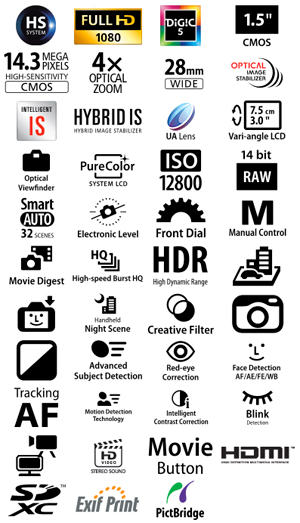
Ah yes, check box marketing at its finest. Looks really impressive, doesn't it? Lots of features in that camera (G1x if you're interested; I was actually looking up how Canon characterized the sensor in that camera, and you'll note that they've moved from "near APS-C" to "1.5 inch" in their descriptions).
But let's look a little more closely. Anyone care to explain what these icons mean:

Let's see, from left to right that would be "two-tone camera," "climbs hills," and "self-parks" (or is it "can take pictures of cars in cities"?). Take the text out of some of the icons and you end up with these bafflers:

which seem to be "can photograph moving eggs" and "can photograph fast-moving super heroes." Or how about this one:

which I like to call "press here when you see a smile on the LCD." Also, notice how the "camera" in all these icons seems to change in style, with many of them suggesting DSLR with the viewfinder hump?
This is marketing? Lest you think I'm just picking on Canon, here's a Nikon version (P310):

Ah, color icons and icon design consistency! Moreover, Nikon has Screen Tips enabled on them, so at least you might be able to make some sense of the heart (third from right), which Screen Tips tells us is "Scene Auto Selector." Of course, clicking on the icon doesn't actually take us somewhere that explains what "Scene Auto Selector" means. Also, the middle icon is "Clear Color Display." As opposed to what, an unclear one?
I've always thought that Fujifilm's marketing was more on target, so I went there to see how they handled the same thing:

Pretty straight forward, though EXR Auto isn't obvious and it took me a few clicks to find out what the heck it meant ("...instantly recognizes 58 scene types, automatically optimizes every setting from exposure to white balance..."). Again, a clickable icon (even if a text icon) would have helped.
The tricky part of this is that everyone is playing by their own rules. When you look at all these icons on Web sites, sides of boxes, and in-store displays, you get a mishmash of what the camera maker wants you to get. In reality, a customer would want to know three things:
- Common features: megapixel count (and sensor size), focal lengths, maximum aperture, display (size and pixels), ISO capabilities...
- Advanced or Camera Specific features: focus abilities, IS, raw support, video formats...
- Standards support: PictBridge, HDMI, USB...
and probably in that order. By jumbling everything together in random ways and with different and confusing icons, the camera makers are trying to keep you from being able to make easy comparisons while appearing to provide everything you'd want. It's the "more is better" game.
Compare what the camera makers are doing with icons to what Apple does in its marketing:
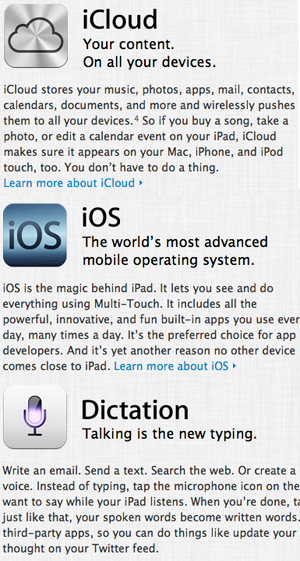
Icon. Name. Overview of benefit. Deeper explanation of benefit. Link to even deeper explanation of benefit. Further: the icons you learn in the marketing materials turn out to be the icons used on the device itself (that's mostly true of Canon, too, though with less consistency). There's a high clarity of messaging and a built in reinforcement so that once you learn what something means, it applies everywhere, even in use of the device, even across devices. In fact, Apple is so good at this that their icons are copied by others (or at least mimicked really closely); that was part of Apple's complaint against Samsung.
So let's go back to that Canon icon of the car and the city. You can click on their Web site under Features and eventually get most of those icons explained to you. (None of the icons on that front page are hot-linked to features, so you may be clicking for awhile to find what something meant and what the benefit of that was. I suspect that most people would have click fatigue before finding out what they wanted to know.) I actually missed the explanation on Canon's site the first time around because here's the actual size where they describe it (I added the orange arrow to point out the icon, which has changed in style and color and is so small now I didn't recognize it):

Before I discovered that, I decided to download the camera manual, and eventually found what I was looking for: that's the icon for miniature effect photography. (Those three icons I called out earlier are: Toy Camera Effect, Monochrome, and Miniature Effect.
But even after looking the G1x manual I still don't know what a happy face in a camera with an arrow on the opposite side of the shutter release means, so maybe it does mean "press here if you see a smile on the LCD."